Clay vs Apollo vs Instantly: What Each Actually Does (And Doesn't)
Clay, Apollo, and Instantly are three of the most popular outbound tools. Here's what each one actually does, what it doesn't do, and why you probably need all three.
Clay vs Apollo vs Instantly: What Each Actually Does (And Doesn't)
Clay, Apollo, and Instantly are the three tools that come up in every outbound conversation. They each have strong marketing, active communities, and thousands of users. They each claim to handle outbound.
None of them does everything.
I've spent months using all three (and a dozen other tools) building our outbound system. This isn't a feature comparison from their marketing pages. It's what each tool actually does well, where it falls short, and why you almost certainly need more than one.
The Quick Comparison
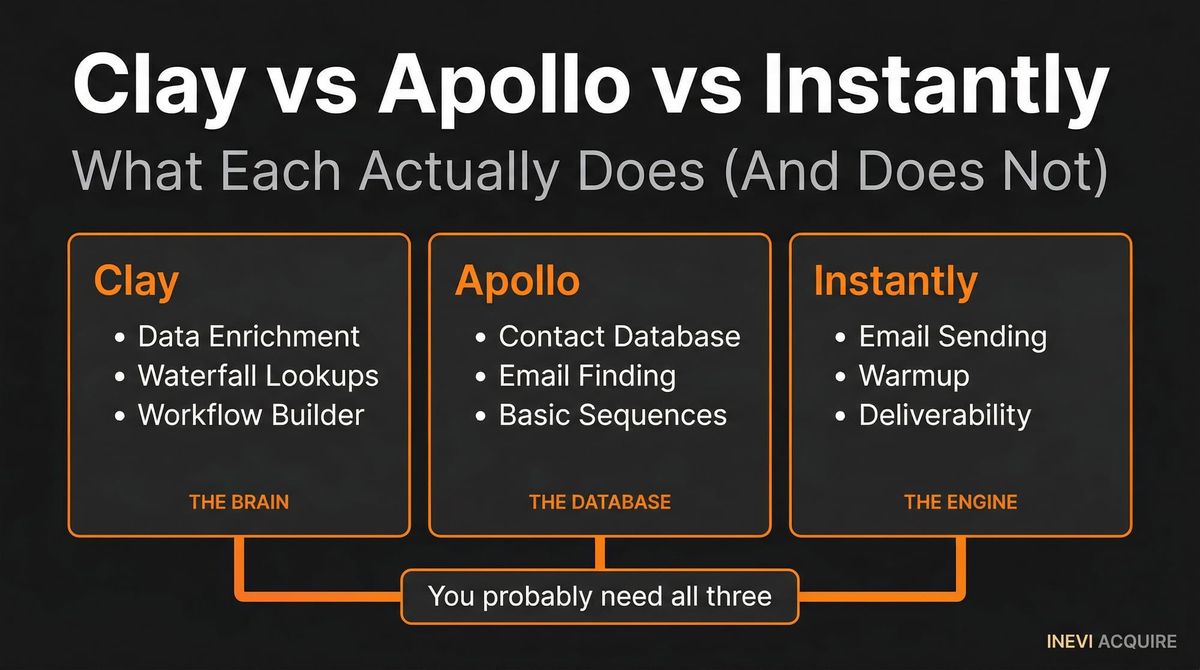
Clay, Apollo, and Instantly are three of the most popular B2B outbound tools, but they serve different functions. Clay is a workflow builder for connecting data sources and automating enrichment. Apollo is a contact database with built-in sequencing. Instantly is an email sending platform optimized for deliverability at scale. Understanding where each excels and falls short is critical to building a working outbound stack.
| Clay | Apollo | Instantly | |
|---|---|---|---|
| Primary function | Workflow builder + data orchestration | Contact database + sequencing | Email sending + deliverability |
| Best at | Connecting data sources, building enrichment workflows | Finding contact data, running sequences | Sending high-volume email with inbox rotation |
| Data source | Integrates 75+ providers (you choose) | Own database (275M+ contacts) | No native data (bring your own) |
| Sequencing | No native sequencing | Built-in sequences | Built-in sequences |
| Deliverability | Not its job | Basic | Best-in-class (domain rotation, warmup) |
| Signal detection | Possible with integrations | Limited (funding, hiring filters) | None |
| Learning curve | High | Medium | Low |
| Price | $149-800/mo | $49-99/mo (core) | $30-97/mo |
| Where it fails | Not an end-to-end system | Data accuracy issues | No data or prospecting |
Clay: The Workflow Builder
What It Actually Does
Clay is a spreadsheet-meets-API-orchestrator. It connects to 75+ data providers and lets you build workflows that pull, enrich, and transform data. Think of it as the plumbing between your other tools.
Clay's superpower is chaining multiple data sources together. You can take a list of companies, pull their recent funding data from one source, check their job postings from another, find the CEO's email from a third, verify it with a fourth, and score the lead based on all of this — all in one workflow.
Where It Excels
Multi-source enrichment. Clay is the best tool for cross-referencing data across providers. Need to find a contact's email? Clay can check Apollo, Clearbit, Hunter, and RocketReach in sequence, compare results, and pick the most reliable one. This is the difference between 70% coverage (single source) and 90%+ (multi-source).
Custom workflows. If your outbound process requires non-standard logic — like qualifying companies based on a combination of tech stack, headcount growth, and job posting content — Clay can build that workflow. It's the most flexible tool in the space.
Data transformation. Clay handles the messy work of normalizing, deduplicating, and formatting data from multiple sources. This sounds boring but it's the work that breaks most DIY outbound setups.
Where It Falls Short
It's not an end-to-end system. Clay builds the workflow. It doesn't send emails. It doesn't manage deliverability. It doesn't handle sequences. You still need a sending tool (Instantly, Smartlead) and probably a CRM to manage the pipeline.
The learning curve is real. Clay is powerful but complex. Building a workflow that actually works reliably takes days, not hours. The tutorials make it look simple because they show individual steps — connecting those steps into a production-ready workflow with error handling and edge cases is the hard part.
Credits add up. Clay charges per action (enrichment lookup, API call). A complex workflow that touches 5 data sources per prospect costs 5 credits per prospect. At scale, this adds up fast. A workflow processing 1,000 prospects per month through 5 enrichment sources costs 5,000 credits — well above the base plan.
No signal detection. Clay can process signals once you feed them in, but it doesn't detect signals on its own. You need a separate signal source (Trigify, job board monitoring, funding databases) to provide the input that Clay then enriches and routes.
Who Should Use Clay
Teams with a dedicated operator (GTM engineer, RevOps manager) who want to build a custom outbound workflow. Clay is the right tool if you have the technical skill to build and maintain the workflow, and you're willing to invest in the learning curve.
Clay is not the right tool if you're looking for a turnkey solution. It's infrastructure, not an application.
Apollo: The Contact Database
What It Actually Does
Apollo is primarily a contact database with 275M+ contacts and built-in sequencing. You search for contacts by firmographics (industry, company size, title, location), add them to lists, and run email sequences directly from the platform.
It's the closest thing to an all-in-one outbound tool — data, sequencing, and basic analytics in one platform.
Where It Excels
Contact data breadth. Apollo has one of the largest B2B contact databases. For common personas at mid-to-large companies, Apollo's coverage is strong. You can find a VP of Sales at a 200-person SaaS company within seconds.
Speed to first sequence. Apollo has the lowest time-to-first-email of any tool in the space. You can sign up, search for contacts, build a sequence, and start sending within a day. For teams that want to test outbound quickly, this matters.
Built-in sequencing. No need for a separate sending tool. Apollo handles sequences, reply detection, and basic A/B testing inside the platform. For simple outbound workflows, you don't need to connect external tools.
Price. At $49-99/month for core plans, Apollo is the most affordable entry point into outbound. The free plan gives you limited credits to test the data quality before committing.
Where It Falls Short
Data accuracy. This is Apollo's biggest weakness. Apollo's contact data is crowd-sourced and aggregated from multiple sources. The accuracy varies significantly by segment. In our testing, Apollo returned valid email addresses for 68% of contacts in our ICP. That means nearly 1 in 3 emails were wrong — and wrong emails mean bounces, which damage sender reputation.
For comparison: cross-referencing three enrichment providers (via Clay or a similar tool) got us to 91% accuracy on the same list.
Single source limitation. Apollo only uses its own data. You can't plug in Clearbit, Lusha, or other providers to fill coverage gaps. What Apollo has is what you get. If your ICP is in a segment where Apollo's coverage is thin, there's no workaround inside the platform.
Deliverability is basic. Apollo offers basic sending capabilities but doesn't match dedicated deliverability tools like Instantly. There's no domain rotation, limited warm-up functionality, and basic inbox placement optimization. At scale, this matters.
Limited signal intelligence. Apollo offers basic filters for funding rounds and job postings, but it's not a signal detection system. You're still starting from a static list filtered by firmographics — you just have some additional filters to narrow it.
Who Should Use Apollo
Teams that want to test outbound quickly with minimal setup. Apollo is a great starting point for understanding your ICP, testing messaging, and getting initial data on response rates. It's less suitable as the long-term production system because of the data accuracy and deliverability limitations.
Think of Apollo as the car you learn to drive in, not the car you race.
Instantly: The Sending Platform
What It Actually Does
Instantly is an email sending platform optimized for deliverability at scale. It manages multiple sending accounts, rotates domains automatically, handles warm-up, and monitors inbox placement. Its job is to make sure your emails land in the inbox, not spam.
Where It Excels
Deliverability management. This is Instantly's core competence and it does it better than any competitor. Domain rotation, automated warm-up, sender reputation monitoring, inbox placement testing — Instantly handles the entire deliverability stack. Our system maintains 95%+ inbox placement rates using Instantly's infrastructure.
Scale. Instantly can manage dozens or hundreds of sending accounts and rotate between them intelligently. This is critical for high-volume outbound where no single domain should send more than 30-50 emails per day to maintain reputation.
Warmup. Instantly's warm-up network is the largest in the space. New domains reach sending readiness in 14-21 days with automated warm-up that simulates real email engagement patterns. Without proper warm-up, new domains get flagged as spam almost immediately.
Price-to-value. At $30-97/month for most plans, Instantly provides professional-grade deliverability management at a fraction of what enterprise tools charge.
Where It Falls Short
No prospecting data. Instantly doesn't know who to email. It sends emails — it doesn't find contacts, enrich data, or detect signals. You need to bring fully built prospect lists from another source.
No signal detection. Like most sending tools, Instantly has no awareness of why you're emailing someone. It's a delivery mechanism, not an intelligence layer.
Limited analytics. Instantly reports on email-level metrics (opens, clicks, replies, bounces) but doesn't connect those metrics to pipeline outcomes. You need a CRM or external tracking to understand which campaigns actually generate revenue.
Sequence sophistication. Instantly handles linear sequences well (email 1 → wait → email 2 → wait → email 3) but lacks the branching logic of more advanced sequencing tools. If you want different follow-up paths based on engagement type, you'll need additional tooling.
Who Should Use Instantly
Everyone doing outbound at any meaningful scale. Deliverability is the single most important factor in whether your outbound works or doesn't. You can have the perfect message, the perfect target, and the perfect timing — but if the email lands in spam, nothing happens.
Instantly is the layer that keeps your emails in the inbox. It's not optional.
The Real Problem: Connecting Them
Here's the part nobody tells you.
Clay finds and enriches the data. Apollo has the contact database. Instantly sends the emails. You need all three — or tools that cover all three functions. But buying all three tools doesn't give you a working outbound system. It gives you three tools that don't talk to each other.
The connection layer is where outbound breaks.
Getting Clay to output enriched, verified prospects in the format Instantly needs. Routing different signal types to different sequences. Handling edge cases — what happens when enrichment returns incomplete data? When a contact already exists in another sequence? When two signals fire for the same company?
This connection work is what a GTM engineer does. It's what makes the tool stack a system instead of a collection of software. And it's what 73% of companies give up on within 30 days of trying.
The tools are individually good. The challenge was never "which tool should I buy?" The challenge is "who connects them into something that runs reliably every day?"
How to Think About Your Stack
If you're evaluating outbound tools, here's the framework:
| If you have... | Start with... | Add... | Skip... |
|---|---|---|---|
| No outbound experience | Apollo (test and learn) | Instantly when ready to scale | Clay (too complex to start) |
| A GTM engineer | Clay + Instantly + signal sources | Apollo for additional data coverage | Nothing (build the custom stack) |
| Budget but no operator | A managed system | Nothing (the system includes the tools) | Individual tools (no one to run them) |
| Working outbound that needs to scale | Instantly for deliverability | Clay for multi-source enrichment | Apollo (you've outgrown single-source) |
The honest answer for most companies: you probably need functionality from all three, but you might not need to buy and manage all three yourself. The complexity of connecting these tools is the reason managed systems exist.
FAQ
Can Clay replace Apollo?
Not entirely. Clay is a workflow builder that connects to Apollo (and 75+ other data providers) but doesn't have its own contact database. You can use Apollo's data through Clay's integration, which actually gives you better results — Clay adds other data sources on top of Apollo to fill coverage gaps. But Clay doesn't replicate Apollo's ease of use for quick prospecting and list building.
Can Instantly replace Apollo's sequencing?
Yes, and for most use cases it should. Instantly's deliverability management is significantly better than Apollo's built-in sending capabilities. If you're sending more than 100 emails per day, Instantly's domain rotation and warmup features are worth the additional cost. Use Apollo for data, Instantly for sending.
Do I need all three tools?
You need the functions all three provide — data enrichment, contact discovery, and deliverability management — but not necessarily all three specific tools. Some companies use alternatives (Lemlist instead of Instantly, Clearbit instead of Apollo). The point is that no single tool covers all three functions, so you'll need at least 2-3 tools plus the integration work to connect them.
What's the total cost of running Clay + Apollo + Instantly?
Base costs: Clay ($149-800/mo) + Apollo ($49-99/mo) + Instantly ($30-97/mo) = $228-996/mo for the tools alone. Add Clay credit costs for enrichment at scale ($200-1,000+/mo), email verification ($50-300/mo), and signal sources ($200-1,500/mo). Realistic total: $700-3,000/mo in software. The bigger cost is the operator who manages it — $120,000-150,000/year for a GTM engineer.
How long does it take to connect Clay, Apollo, and Instantly into a working system?
For someone experienced with all three tools: 2-4 weeks to build a basic working workflow, plus 2-3 months of optimization to handle edge cases and improve conversion rates. For someone learning the tools: 2-4 months for the initial build, with a high probability of giving up around week 3-4 when the integration complexity becomes apparent.
Want to skip the tool evaluation and plug into a system that's already built? Get a free Signal Audit — no commitment, no card required.